Your Progress Diary: Feeds
All swings, practice guides, assessments and more live here. Discover how you improve over time, and if you're working with a Sportsbox Coach, see their notes here.
Student's Perspective: What can I do?
Learn💡: View and share activity from their coach
Any materials from a previous lesson (swings, voiceovers, notes, drills) posted by a Coach will all live in this centralized location
Message coach directly via the "Message" icon next to your coach's name
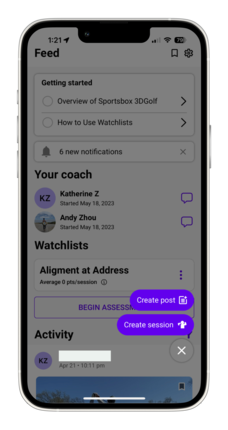
Progress and Review📈 : Quick overview of improvements and goals
Feeds is your "Activity Journal" that you can reference at any time. Swings and posts from the past and future will live here.
Guided Practices: Training content curated by your coach
Coaches will post assigned practice guides, watchlists, drills, and lesson recordings on your Feed
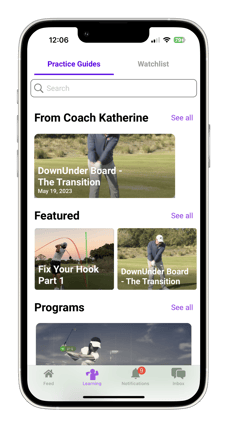
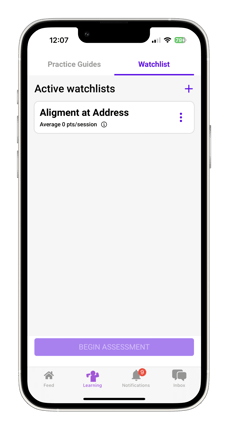
Feedback 🗣️ : Post videos, pictures, and text for your coach to respond to on your Feed
Work with Coach's remotely in comments. Confused about what to work on? Just ask on Feeds!
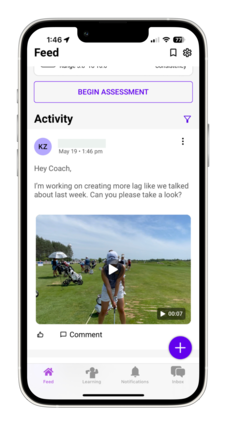
Organization 🎯: Anything related to golf lives here — consolidate all thoughts on one platform
Save Posts: Find a post you worked on with your Coach important? "Save" it to return to later on! Click the SAVE ICON

on the top right corner of the homepage to revisit saved posts.
Filter Content: Looking for only swing and not messages/media? Or, do you only want to see messages and nothing else? Use the FILTER ICON

to choose what you want to see in a sea of activity.