How to get a copy of your Sportsbox 3DGolf subscription receipt or invoice depends on which Platform you used when you initially subscribed:
Log in to the web portal with your email and password >>
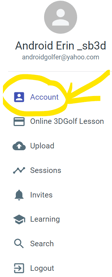
Click ACCOUNT (top left corner) >>
Locate the SUBSCRIPTION PLATFORM >>
-->
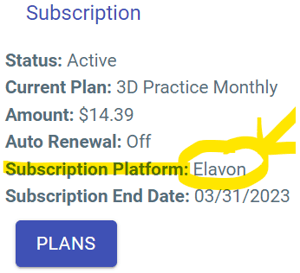
If the SUBSCRIPTION PLATFORM says:
ELAVON or STRIPE , contact SUPPORT to ask for a copy of your receipt (you can also search your email for the original purchase receipt)
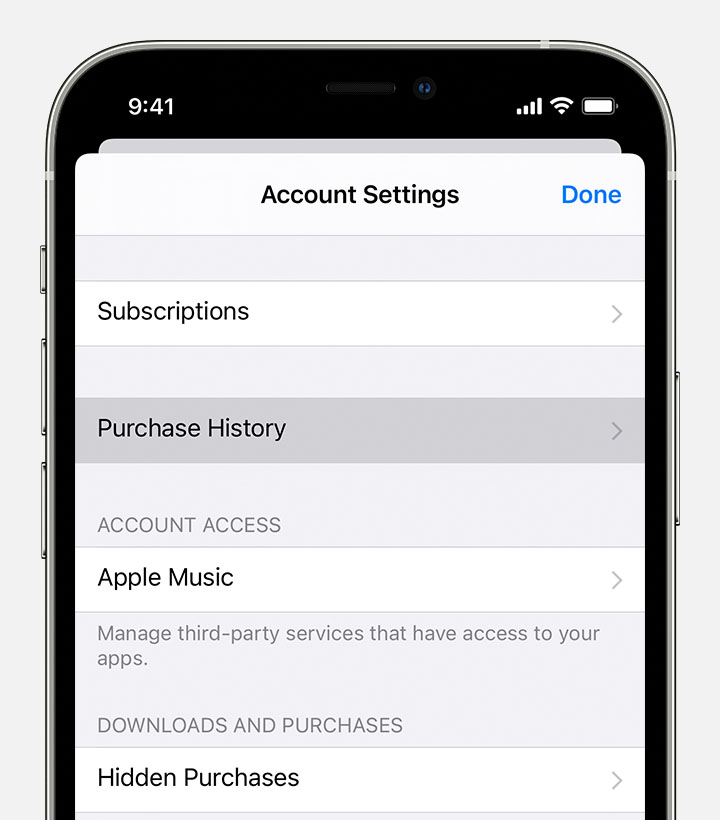
APPLE , you can view your purchase history from the App Store
Open the settings app on your iOS device
Tap your name, then tap Media & Purchases
Tap View Account. You might be asked to sign in.
Tap Purchase History
GOOGLE , you can view your order history on Google Play
On your Android device, open the Play Store
At the top right, tap your profile icon
Tap Payments & subscriptions. Budget & history.
Tap Purchase history