How to cancel your Sportsbox 3DGolf subscription depends on which Platform you used when you initially subscribed:
Log in to the web portal with your email and password >>
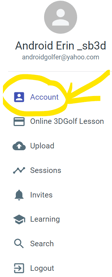
Click ACCOUNT (top left corner) >>
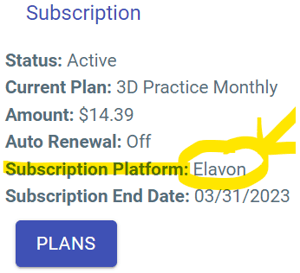
Locate the SUBSCRIPTION PLATFORM >>
-->
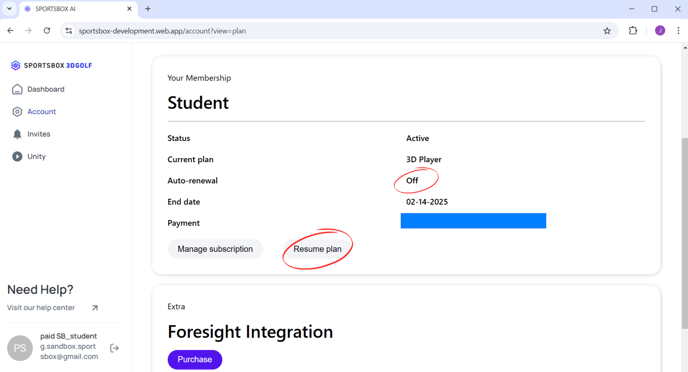
SUCCESSFUL CANCEL = auto renewal is off & the “Resume Plan” button appears.
If the SUBSCRIPTION PLATFORM says:
ELAVON or STRIPE , click CANCEL on the web portal and confirm your cancelation.
APPLE , you must cancel on your iOS device -> please cancel with Apple.
Open the settings app on your iOS device
Tap your name
Tap subscriptions
Tap the Sportsbox subscription
Tap Cancel Subscription

GOOGLE , you must cancel on your Android device -> please cancel with Google.
On your Android device, go to your subscriptions in Google Play
Select the subscription you want to cancel
Tap Cancel Subscription
Follow the instructions
Note: This is the only way to cancel your account and end your subscription from future payments. Signing out of your account or deleting the app doesn’t cancel your account.
Details:
Subscriptions automatically renew unless auto-renew is turned off at least 24 hours prior to the end of the current period.
We do not offer refunds on subscription purchases as stated in our Terms & Services.
If you cancel before the end of your current billing period, you can use the Sportsbox 3DGolf app until the end of the period (month or year).