How to Upgrade your Sportsbox 3DGolf subscription depends on which Platform you used when you initially subscribed:
Log in to the web portal with your email and password >>
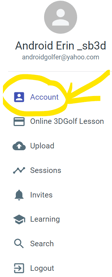
Click ACCOUNT (top left corner) >>
Locate the SUBSCRIPTION PLATFORM >>
-->
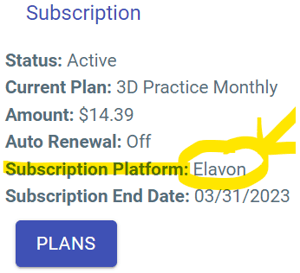
If the SUBSCRIPTION PLATFORM says:
ELAVON or STRIPE , contact SUPPORT to help upgrade or change your subscription.
APPLE , you must upgrade on your iOS device -> how to switch to a different subscription plan
Open the settings app on your iOS device
Tap your name, then tap subscriptions
Tap the Sportsbox subscription
Tap See All Plans, then follow the onscreen instructions to complete your purchase
GOOGLE , you must upgrade on your Android device -> how to change a subscription on Google Play
On your Android device, go to your subscriptions in Google Play
Select the subscription you want to upgrade
Click Manage
Select the plan you want to change to